Integration Options
A decision guide for choosing between Fully Hosted Checkout, Custom Checkout, online-only SDKs, and the POS Terminal SDK.
Forage is PCI Level 1 compliantForage meets the highest level of PCI DSS certification, ensuring secure handling of cardholder data and protecting sensitive payment information.
Forage builds software tools that grocers and merchants of all sizes can use to accept online and in-person EBT payments.
There are several ways to integrate Forage:
The best integration option for you depends on how you want to handle Split Tender.
Decide how to handle split tender
Even if every item in a cart is EBT eligible, transaction, delivery, and other common fees are not. Customers almost always need to use multiple payment methods to pay for an order. For example, an EBT Card pays for EBT eligible items, and customers use a credit/debit card for ineligible items and fees or to cover any outstanding balance. This is Split Tender.
flowchart TD
    A{Do you want Forage<br />to handle split tender?}
    A -->|YES| B[Fully Hosted Checkout]
    A -->|NO| C{Do you want to collect<br />EBT inline at checkout?}
    C -->|YES| D[Forage SDKs]
    C -->|NO| E[Custom Checkout]
Read on for an introduction to each integration option, or jump to compare integration features.
Explore integration options
Fully Hosted
With Fully Hosted, Forage handles EBT and credit/debit card collection, split tender, and payment capture. You redirect the customer to Forage Checkout; Forage sends them back when it's done.
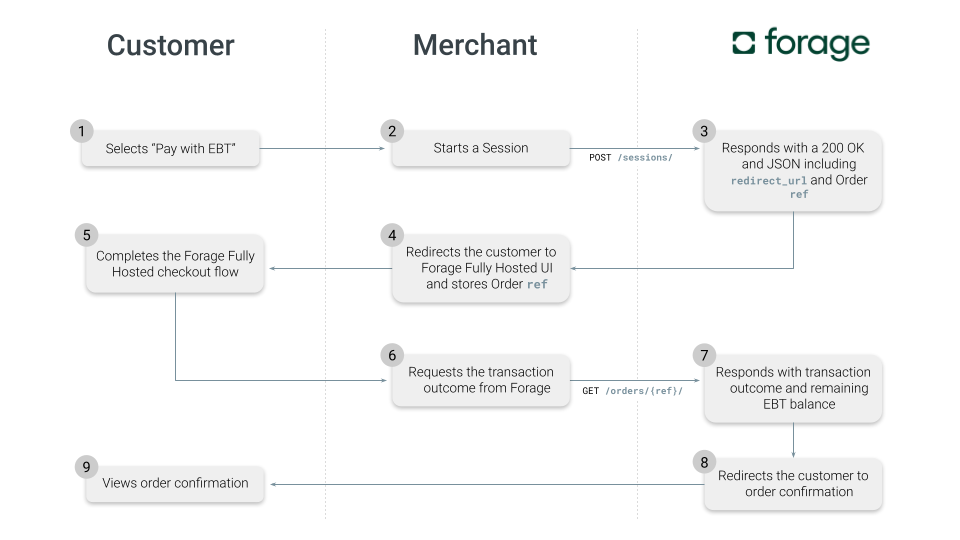
Fully Hosted is ideal if you have limited developer resources or want to start accepting EBT payments quickly. See the Fully Hosted Checkout guide for more information.
Custom
With Custom Checkout, Forage handles EBT only. You integrate a separate credit/debit card processor (like Stripe) and are responsible for Split Tender, taxes, and EBT error scenarios yourself.
Your checkout page collects the customer's EBT card number, tender amounts, and credit/debit card details. When the customer places the order, your site redirects them to a Forage-hosted UI to enter their EBT PIN. Forage charges the EBT card and redirects the customer back to your site for order confirmation.
Custom is the best fit if you want to use Forage for EBT while keeping your existing checkout flow mostly intact. See the Guide to Custom Checkout for more information.
Balance checkYou can optionally redirect customers to a Forage-hosted balance check UI before payment. One exception: if your site offers guest checkout, FNS regulations prohibit balance inquiries entirely. Skip this step.
Online-only SDKs
You can use Forage SDKs to build a fully customizable, native EBT checkout UI with no redirects. SDKs are the best fit if your top priority is controlling the complete checkout experience or building for Android or iOS.
With an SDK integration, you're responsible for Split Tender, sales tax, and EBT error scenarios.
SDK version requirementsFor SDK version requirements and platform-specific quickstart links, see EBT Standards and Integration Reference.
POS Terminal SDK
Use the Forage POS Terminal SDK to accept in-person EBT payments via an Android device at a physical store location.
For more information, check out:
Key takeaways
The right integration comes down to two questions: how much of Split Tender you want Forage to handle, and how much control you want over the checkout UI. Fully Hosted minimizes engineering lift; Custom and SDK integrations give you more control at the cost of handling more scenarios yourself.
For in-person payments, the POS Terminal SDK is its own category. It's not an alternative to the online options and can be used alongside any of them.
For a full feature comparison and SDK version requirements, see EBT Standards and Integration Reference.
Updated 5 months ago